









This guide is written to help business owners, SaaS founders, and WordPress plugin users correctly set up Twilio for SMS usage in the United States, including A2P 10DLC verification, which is now mandatory for business messaging.
Failure to complete these steps correctly will result in message blocking, low delivery rates, or account suspension. Follow this guide precisely to ensure approval.
1. Create a Twilio Account
Check Out Volts Connect
Step 1: Sign Up
- Go to twilio.com
- Click Sign Up
- Register using:
- Business email (recommended)
- Google account (acceptable)
- Verify:
- Email address
- Phone number (OTP)
Step 2: Choose Account Type
When prompted:
- Select “Business”
- Industry: Choose accurately (e.g., Software, Marketing, E-commerce)
- Intended use: SMS notifications / customer communication
⚠️ Avoid selecting “Personal” — personal accounts are often rejected during A2P review.
2. Complete Business Profile (Critical for A2P Approval)
Before buying a number, complete your Business Profile.
Navigate To:
Twilio Console → Trust Hub → Business Profiles
Required Information:
| Field | What to Enter |
|---|---|
| Legal Business Name | Registered business name |
| Business Type | LLC, Corporation, Sole Proprietor |
| Registration Number | EIN / Business ID |
| Website URL | Must be live, public, and functional |
| Business Address | Real physical address |
| Support Email | Must match your domain |
| Support Phone | Reachable number |
⚠️ Website Requirements (Strict):
Your website must include:
- Privacy Policy
- Terms of Service
- Contact page
- Clear description of SMS usage
Check Out Volts Connect
3. Buy a Twilio Phone Number
Navigate To:
Twilio Console → Phone Numbers → Buy a Number
Best Practices:
- Country: United States
- Capabilities:
- ✅ SMS
- ✅ MMS (optional)
- Number Type:
- Local (recommended)
- Toll-Free (optional, different verification)
Purchase the Number
- Monthly cost: ~$1–$2
- SMS usage billed per message
📌 You cannot send A2P traffic without a registered number.
4. Understand A2P 10DLC (Why This Is Mandatory)
A2P (Application-to-Person) 10DLC is required by U.S. carriers to:
- Prevent spam
- Improve deliverability
- Identify legitimate businesses
If you send SMS from:
- WordPress plugins
- SaaS platforms
- CRMs
- Marketing tools
➡️ A2P registration is mandatory
5. Register for A2P 10DLC (Main Verification Process)
Navigate To:
Twilio Console → Trust Hub → A2P 10DLC
You must complete three components:
A. Brand Registration
This identifies who you are.
Required Fields:
- Brand Type: Standard
- Legal Business Name
- EIN / Tax ID
- Business Address
- Website URL
- Industry
- Business Description (Very Important)
Business Description Example:
We provide SMS notifications and transactional messages to customers who opt-in through our website and booking forms. Messages include appointment confirmations, order updates, and support notifications.
⚠️ Avoid words like:
- “Bulk”
- “Blast”
- “Promotional spam”
B. Campaign Registration
This defines what messages you send.
Required Fields:
| Field | Example |
|---|---|
| Campaign Type | Low-Volume Mixed / Customer Care |
| Use Case | Account notifications, OTP, alerts |
| Message Flow | User opts in → receives confirmation SMS |
| Opt-In Method | Website form / checkbox |
| Opt-Out Method | Reply STOP |
| Help Message | Reply HELP for support |
Sample Message Templates:
- “Your appointment is confirmed for {{date}}. Reply STOP to opt out.”
- “Your order #{{id}} is ready. Reply HELP for support.”
⚠️ Templates must match real usage.
C. Number Assignment
- Assign your purchased Twilio number
- Attach it to the approved campaign
6. Messaging Service Setup (Highly Recommended)
Navigate To:
Twilio Console → Messaging → Services
Create a Messaging Service and:
- Add your phone number
- Enable:
- Sticky sender
- Smart encoding
- Assign the approved A2P campaign
📌 Messaging Services improve:
- Deliverability
- Compliance
- Scaling
7. Verification Timeline & Fees
Fees (One-Time / Monthly):
| Item | Cost |
|---|---|
| Brand Registration | ~$4–$15 (one-time) |
| Campaign Registration | ~$10–$30 (one-time) |
| Monthly Campaign Fee | ~$10 |
| SMS Cost | Per message |
Approval Time:
- Brand: 1–3 business days
- Campaign: 1–5 business days
⚠️ Incorrect info causes automatic rejection.
8. Common Reasons for A2P Rejection (Avoid These)
- No Privacy Policy or Terms page
- Generic or fake website
- Mismatch between message content & campaign
- No opt-in explanation
- Using shared URLs (bit.ly, linktr.ee)
- Promotional language without consent
9. Post-Approval Checklist
Once approved:
- ✅ Send only approved message types
- ✅ Always include STOP compliance
- ✅ Log opt-ins
- ❌ Do NOT change message purpose without updating campaign
- ❌ Do NOT add random users
Carriers monitor behavior after approval.
10. Final Recommendation (Business-Critical)
If you are:
- Running a WordPress SMS plugin
- Operating a SaaS messaging platform
- Sending customer notifications at scale
➡️ Complete Business Profile + A2P before going live
Skipping steps will break SMS delivery and damage sender reputation permanently.
Use Twilio Inside WordPress With Volts Connect
Once your Twilio account is set up, your phone number is active, and A2P 10DLC verification is complete, the next challenge is actually using Twilio day to day.
Twilio by itself is powerful, but it’s not designed as a conversation inbox or team messaging tool. Most businesses end up juggling the Twilio console, spreadsheets, shared phones, or custom scripts just to manage SMS.
Volts Connect bridges that gap by bringing Twilio directly into WordPress.
What Volts Connect does
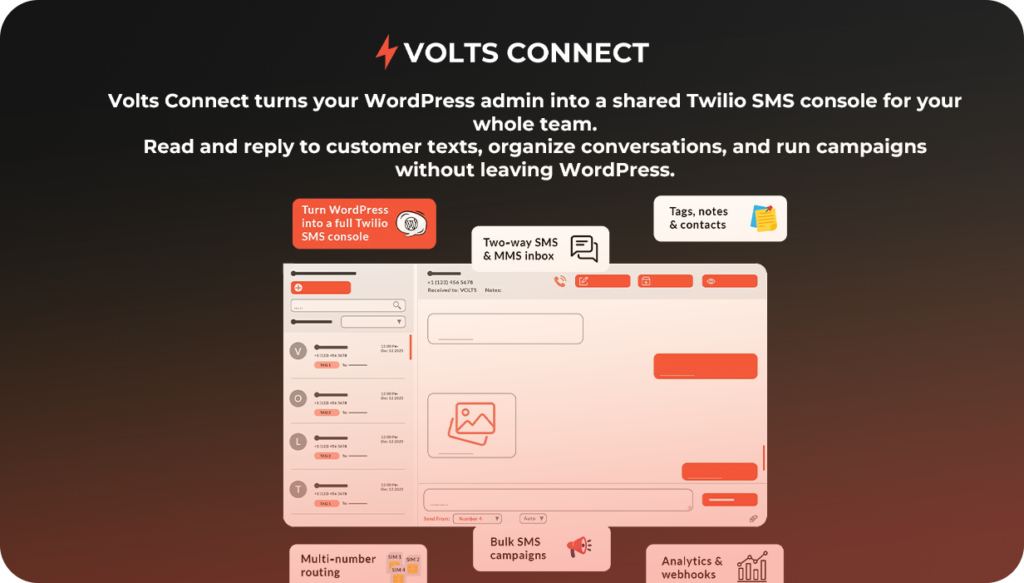
Volts Connect is a licensed WordPress plugin that turns your site into a full SMS console powered by Twilio. It allows you to:
- Send and receive two-way SMS & MMS directly from the WordPress dashboard
- Manage conversations in a shared inbox instead of the Twilio console
- Store contacts with tags, notes, and custom fields
- Track analytics like message volume, response rate, and campaign activity
- Run bulk SMS campaigns, automations, and WooCommerce notifications using add-ons
- Manage multiple Twilio phone numbers from one place
All messages are sent through your own Twilio account — Volts Connect simply provides the interface and workflow layer.
When Volts Connect makes sense
Volts Connect is a good fit if you:
- Want to use Twilio with WordPress without writing custom code
- Need a shared SMS inbox for support, sales, or operations
- Plan to send compliant A2P 10DLC messages at scale
- Run a WooCommerce store or service business that relies on SMS
- Manage SMS for clients or multiple phone numbers
If you’ve already completed Twilio setup and A2P verification, Volts Connect lets you start using SMS immediately without building your own system.
👉 Learn more about Volts Connect here: https://voltsconsulting.com/volts-connect
Other-
1. Website Compliance Requirements (Mandatory)
Your website is reviewed manually and automatically during A2P approval. Missing any item below is the #1 cause of rejection.
Required Pages (Must Be Public & Linked)
✅ Privacy Policy
Must explicitly mention:
- SMS data usage
- Phone number handling
- No data selling
Required Clause (Copy-Paste):
We collect phone numbers only when users voluntarily provide them. Phone numbers are used solely for transactional and service-related SMS communications. We do not sell or share mobile information with third parties for marketing purposes.
✅ Terms of Service
Must include:
- SMS usage terms
- Opt-out instructions
- Liability disclaimer
Required Clause:
By providing your phone number, you consent to receive SMS messages related to your account, appointments, or service notifications. Message frequency varies. Message and data rates may apply. You may opt out at any time by replying STOP.
✅ Contact Page
Must show:
- Business name
- Physical address
- Support email
- Support phone number
✅ SMS Disclosure (Can Be on Contact or Form Page)
Required Disclosure Text:
By submitting this form, you consent to receive SMS notifications related to your request or account. Reply STOP to opt out. Reply HELP for support. Message and data rates may apply.
2. Website Form Requirements (CRITICAL)
Every opt-in form that collects a phone number must include the following elements.
Required Fields
- Full Name
- Phone Number
- Email Address (recommended)
- Consent checkbox (unchecked by default)
Required Checkbox (Copy-Paste EXACTLY)
Checkbox Label:
☐ I agree to receive SMS notifications related to my account, appointments, or services. Reply STOP to opt out. Reply HELP for help. Message and data rates may apply.
Checkbox Rules
- ❌ Cannot be pre-checked
- ❌ Cannot be hidden
- ❌ Cannot be bundled with Terms acceptance
- ✅ Must be optional but required to submit SMS
Optional (Highly Recommended)
- Timestamp logging
- IP address logging
- Page URL stored with submission
These strengthen compliance if audited later.
3. Pre-Approved Brand Registration Description (Copy-Paste)
Use this in Twilio Console → Trust Hub → A2P Brand Registration
Brand Description
We are a business communication platform that sends transactional and service-related SMS messages to users who explicitly opt in through our website forms or application interfaces. Messages include appointment confirmations, service updates, account notifications, and customer support communications. We do not send unsolicited messages, and all recipients can opt out at any time by replying STOP.
Industry
- Software
- Professional Services
- Business Services
(Choose the closest legitimate match)
Brand Type
- Standard Brand
4. Pre-Approved Campaign Registration (Copy-Paste)
Use this in Twilio Console → Trust Hub → A2P Campaign Registration
Campaign Type
Low-Volume Mixed
(or Customer Care if strictly support-related)
Campaign Description
This campaign is used to send transactional and service-related SMS messages to customers who have explicitly opted in through our website or application. Messages include appointment confirmations, reminders, service updates, order notifications, and customer support communications.
Message Flow (Very Important)
Users submit their phone number through a website form or application interface and explicitly opt in by checking a consent box. After opting in, users receive SMS messages related to their account activity or service requests.
Opt-In Method
- Website form
- Application signup
- Booking form
Opt-Out Method
Users can opt out at any time by replying STOP to any message.
Help Message
Users can reply HELP to receive support contact information.
Sample Messages (Carrier-Safe)
Use only these styles initially.
Transactional Examples
- “Your appointment is confirmed for {{date}} at {{time}}. Reply STOP to opt out.”
- “Your service request has been received. We will contact you shortly. Reply HELP for support.”
- “Your order {{order_id}} is ready. Reply STOP to opt out.”
Support Example
- “Support update: your request is being reviewed. Reply HELP for assistance.”
❌ Avoid:
- “Limited offer”
- “Sale”
- “Discount”
- “Blast”
- “Marketing campaign”
5. STOP / HELP Auto-Response (Required)
Configure these in your SMS system or plugin.
STOP Response
You have been opted out and will no longer receive SMS messages. Reply START to re-subscribe.
HELP Response
For support, contact us at support@yourdomain.com or visit yourdomain.com/contact.
6. Common Rejection Triggers (Avoid at All Costs)
- Missing checkbox consent
- Generic website with no real business info
- URL shorteners (bit.ly, linktr.ee)
- Mismatch between campaign description and actual usage
- Promotional language without explicit consent
- Using “marketing” in campaign name
7. Final Approval Strategy (Proven)
For highest approval success:
- Submit Brand first
- Wait for Brand approval
- Submit Campaign using wording above
- Assign number only after approval
- Send low volume initially
This mirrors carrier trust scoring models.